
Cards printed once, details edited after
A hosted profile per person with a code on the card. Change the phone number, the job title or the photograph and every card already in somebody's wallet is up to date.
What the person scanning gets
A page with the name, role, photo, phone, email, addresses and links — and a button that saves the lot into their contacts as a vCard. That button is the whole point: a card that stays in a browser tab is a card that gets closed.
A QR on the card itself
The card carries a code of your own details at the bottom. Somebody across a table points a camera at your screen and you are in their phone — no app, no download, nothing typed. It is also the answer to a phone that handles a downloaded .vcf badly, which is most of them.
One per person, and nobody chasing them
Import a staff list and get a card per row, filled in and waiting as drafts — column names read loosely enough for whatever your HR system exports, and a row it cannot use is reported rather than turned into somebody called Untitled. When somebody leaves, an admin edits or retires their card in one place instead of hunting for a page nobody remembers owning.
See it happen
What it looks like
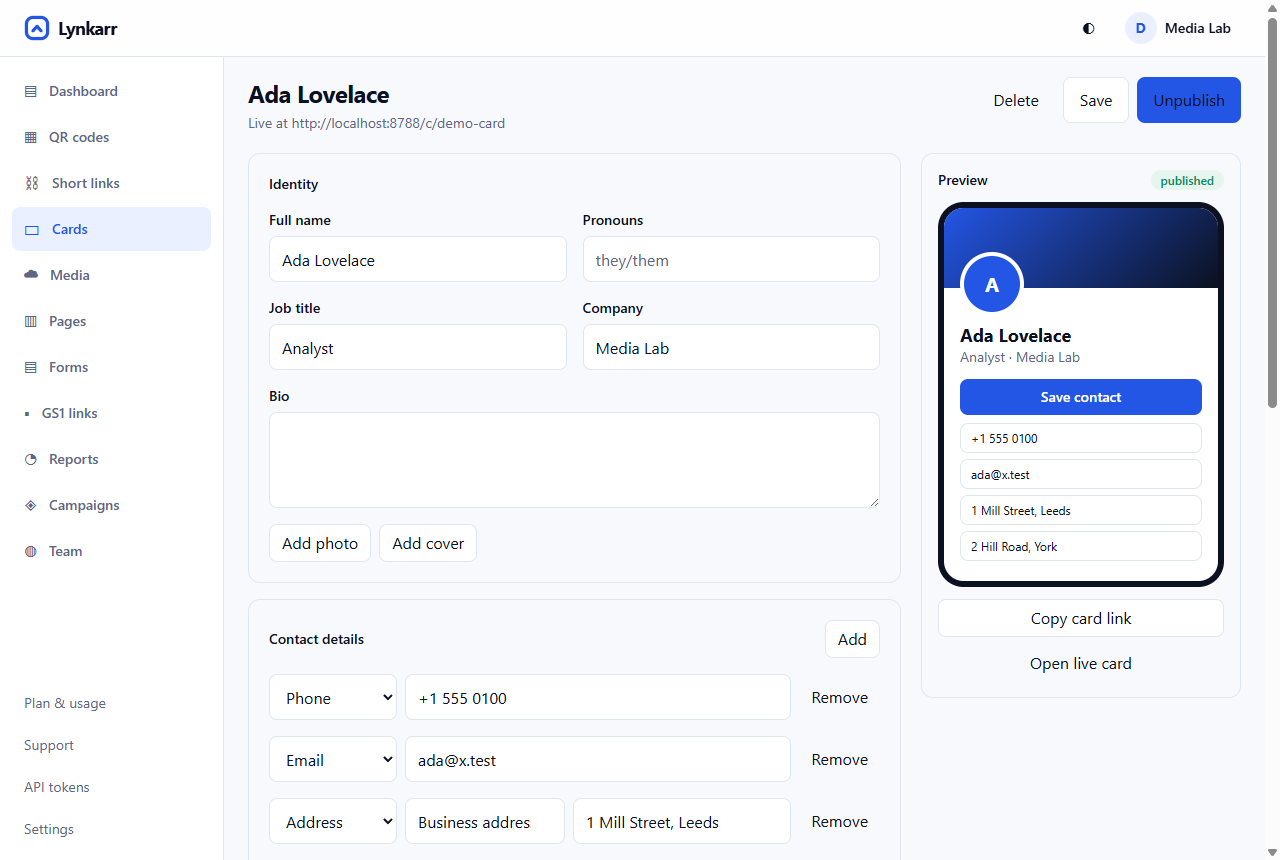 1Name, role, photo — editable after the card is printed2Phones, emails and several labelled addresses3The preview is the published card at its real width
- Name, role, photo — editable after the card is printed
- Phones, emails and several labelled addresses
- The preview is the published card at its real width
What you can do with it
It saves to their contacts, not to a browser tab
The page offers a vCard, so one tap puts your name, number, email and address into their phone's own address book. This is the whole difference between a card that worked and a card that did not: a profile somebody has to remember to come back to is a profile they never come back to.
Everything on it is a field you can edit
New number, new title, new photograph, a role that changed in March. Change it once and every card already in a wallet is current, including the ones you handed out two years ago.
One card per person, managed in one place
On a team plan each person gets their own, and an admin can edit any of them. When somebody leaves, their card is retired here rather than being a page nobody remembers owning.
You find out whether the cards were worth printing
Scans per person, by day and by place. After a conference that is the difference between "we handed out four hundred cards" and "three hundred and twelve people looked us up".
Getting there
-
Fill in the card
Name, role, photo, phone, email, address and links. It takes about two minutes and nothing about it is permanent.
-
Design the code
Your colours, your logo in the middle, and a contrast check before you download — so a card that looks good also scans.
-
Send it to the printer
SVG or PDF for anything being printed properly. Test one proof at final size on the final stock before the run.
-
Edit it whenever you like
The printed square never changes. Everything behind it does.
More in the same place
How to do it
Questions
Do they need an app to scan it?
No. Every phone sold in the last several years reads QR codes with its own camera, and the card opens in the browser they already have.
What happens to cards I already printed if I stop paying?
They keep resolving. A printed card that stops working because a subscription lapsed is a box of cards somebody has to reprint, and we are not willing to be the reason for that. What you lose is the ability to edit the details and the reports behind them.
Can I have one card for the whole company instead?
Yes, though it is usually the wrong choice. A code per person tells you which people the cards actually worked for, and a shared card cannot save a specific person into somebody's contacts.
How small can the code be on the card?
About 2 cm across is the practical floor, with the blank margin around it kept clear — that margin is part of the symbol. The printing notes cover the rest.
What do you record about somebody who scans my card?
Country, region and city from the network, the device and browser, and a salted fingerprint that recognises a repeat visit without identifying a person. No IP address is stored and nobody is asked for their location. The detail is here.
Try it with one code
The free plan has no expiry and asks for no card, and the analytics behind it are the same ones a paying customer gets.
Free forever for one person. No card, and 10,000 scans a month included.