
A studio that checks the code still scans
Colours, a logo in the middle, rounded modules, a frame with a call to action — and a contrast check before you download, because a beautiful code that does not scan is worse than a plain one.
Design
Foreground and background colours, module and eye shapes, a logo with a quiet zone punched out behind it, and framing captions. Everything renders in the browser as you change it, so there is no round trip and no queue.
Twenty-three kinds of code
A website, a contact card, Wi-Fi, an event, a location, a message, a payment, a file, a product passport — and one code that sends an iPhone to the App Store and an Android phone to Google Play by working out which is asking.
A bank transfer in the European standard, so a banking app can scan the code and fill the payment in. An audio file that lands on a player rather than a download. Every one of them designed in the same studio and reported on in the same place.
The check
Low contrast and an oversized logo are the two ways a designed code stops working, and neither is visible to a person looking at it. The studio measures the contrast ratio and how much of the symbol the logo covers, and tells you before you download rather than after you print.
Formats
PNG at print resolution, SVG for anything that will be scaled, and PDF for handing to a printer. Vector is the one to use if the code is going on anything larger than a flyer.
Design changes the appearance of the symbol, not its data. A code already on paper cannot be redesigned — only a dynamic code's destination can change after printing.
See it happen
What it looks like
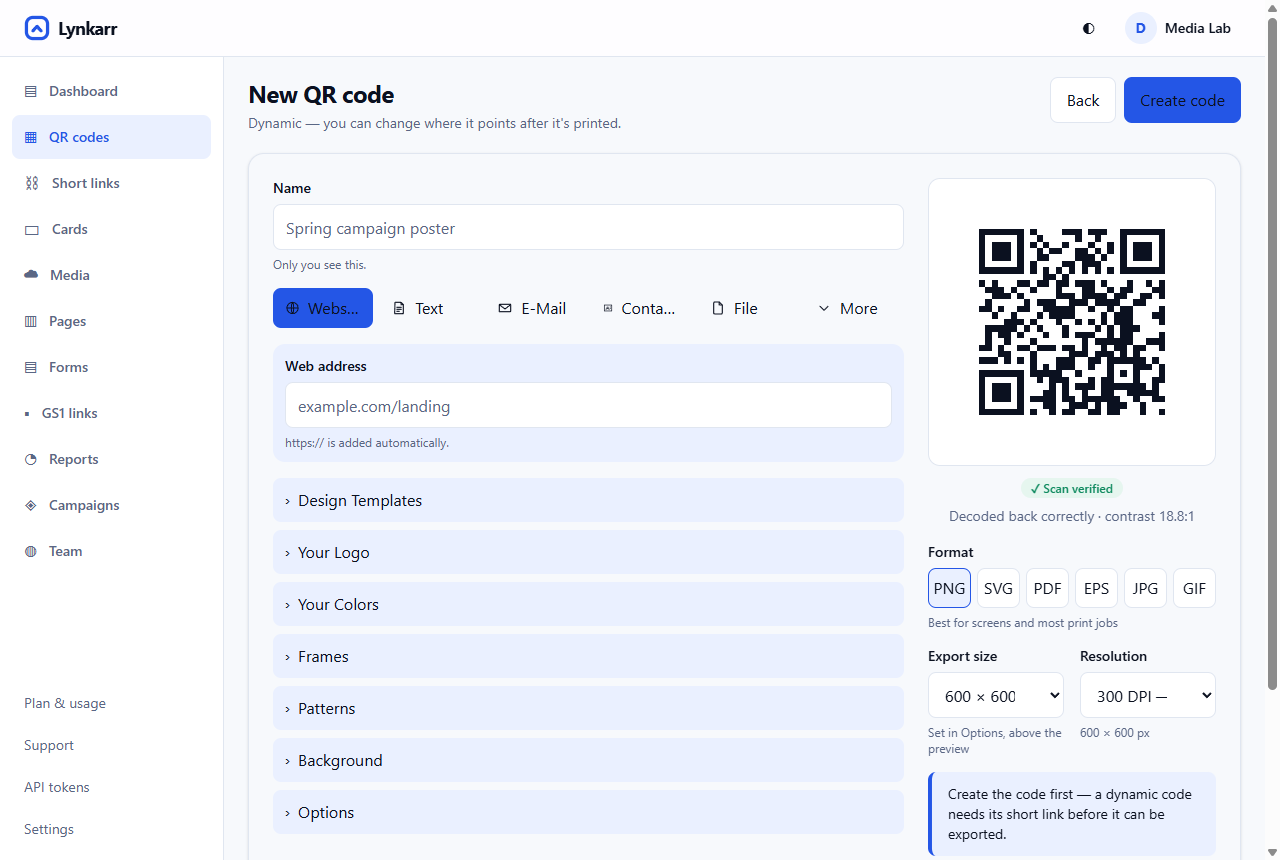 1Pick what the code is for — the form changes to match2The preview is the code, not a picture of one3Checked against a real decode before you can download4Logo, colours, frames and patterns5Dynamic, placement, campaign, alerts6Six formats, sized in millimetres for print
- Pick what the code is for — the form changes to match
- The preview is the code, not a picture of one
- Checked against a real decode before you can download
- Logo, colours, frames and patterns
- Dynamic, placement, campaign, alerts
- Six formats, sized in millimetres for print
What you can do with it
Design it properly — colours, logo, shapes, frames
Foreground and background colours, module and eye shapes, a logo with a quiet zone punched out behind it, and framing captions. Everything renders in the browser as you change it, so there is no round trip and no queue.
The check that stops a beautiful code failing
Low contrast and an oversized logo are the two ways a designed code stops scanning, and neither is visible to a person looking at it. The studio measures the contrast ratio and how much of the symbol the logo covers, and says so before you download rather than after you print.
Formats that survive a printer
PNG at print resolution, SVG for anything that will be scaled, and PDF for handing over. Vector for anything larger than a flyer: a scaled-up PNG has soft module edges, and soft edges are what a camera struggles with.
Getting there
-
Decide dynamic or static
It cannot be changed later, and the studio says which you are making.
-
Design it
Colours, logo, shape, frame — with the check watching.
-
Download vector
SVG or PDF for anything printed properly.
-
Test the real print
Final size, final stock, an ordinary phone, the real lighting.
More in the same place
Questions
Will adding my logo break the code?
Not if it stays inside roughly a fifth of the area. Beyond that it destroys data faster than the error correction can recover it, and the studio warns you where the line is.
Can I use a light code on a dark background?
It works on many phones and fails on some, which is the worst kind of failure because it looks fine when you test it. Dark on light is the safe way round.
Can I redesign a code I already printed?
No. Design changes the appearance of the symbol, which means a different printed square. Only a dynamic code's destination can change after printing.
Try it with one code
The free plan has no expiry and asks for no card, and the analytics behind it are the same ones a paying customer gets.
Free forever for one person. No card, and 10,000 scans a month included.